Astral Echo
A fast, lightweight desktop media player built with Electron, TypeScript, and Tailwind CSS. Astral Echo scans local folders for audio and video, builds a searchable library, and plays media through a focused, minimal interface, with persistent state, drag-and-drop reordering, OS-level media key support, and full keyboard control.
Overview
Astral Echo is a desktop media player built with Electron, TypeScript, and Tailwind CSS. It scans a local folder for audio and video files, generates a searchable library complete with thumbnails and metadata, and plays media through a minimal, YouTube-inspired interface.
The project started as a way to build a genuinely fast, native-feeling desktop app using web technologies, and turned into a deep dive into Electron's multi-process architecture, IPC communication, native drag-and-drop, OS media integration, and packaging a real, distributable Windows and Linux application from scratch.
The Problem
Most mainstream media players are either heavyweight and feature-bloated (with UI that hasn't meaningfully changed in over a decade) or too minimal to handle a mixed audio/video library with any real polish. I wanted a player that:
- Handled both audio and video from the same local library, without separate apps
- Felt fast to open and use, not like a legacy Win32 application
- Remembered exactly where I left off, track, volume, shuffle, repeat, window position
- Looked and felt like a modern app, not a decade-old skin
- Worked identically well on Windows and Linux
The result was Astral Echo.
The Solution
Astral Echo combines a native Electron shell with a hand-built, YouTube-inspired player UI. Users pick a folder once, and the app recursively scans it, extracts embedded audio metadata (cover art, title, duration), generates video thumbnails, and builds a searchable, draggable library, all cached to disk so subsequent launches are near-instant.
Playback state is fully persistent: volume, shuffle, repeat mode, sidebar width, window size and position, the last folder opened, and the exact track and position last played all survive an app restart. The player also integrates with the operating system's native media controls, so play/pause/next/previous work from hardware media keys and the OS media overlay, not just the in-app UI.
.png)
Main player view, video playback with YouTube-inspired controls
Technical Stack
The stack was chosen to build a genuinely native-feeling desktop app while staying entirely within web technologies I could iterate on quickly. Electron provided the desktop shell and OS integration, while TypeScript and a strict IPC boundary kept the main and renderer processes safely separated.
Application Shell
Renderer
Data & Packaging
Architecture
Astral Echo follows Electron's standard multi-process model with a strict separation
between privileged and sandboxed code. The renderer never touches the file system or
Node.js APIs directly, every privileged operation goes through a typed IPC handler in
the main process, exposed safely to the renderer via contextBridge in the
preload script.
The project is organized into:
-
Main process (
electron/), window lifecycle, and IPC handlers split by concern: settings persistence, thumbnail caching, folder scanning and metadata extraction, and system operations -
Preload bridge, the only surface exposed to the
renderer, a typed
window.apiobject covering every IPC channel -
Renderer (
src/renderer/modules/) , split intoplayer,library,controls, andstatemodules, coordinated through a shared state object rather than scattered globals
As the project grew, the renderer became increasingly difficult to maintain because unrelated features evolved together in the same codebase. Refactoring it into focused modules with clear responsibilities improved maintainability, simplified debugging, and made adding new features significantly easier.
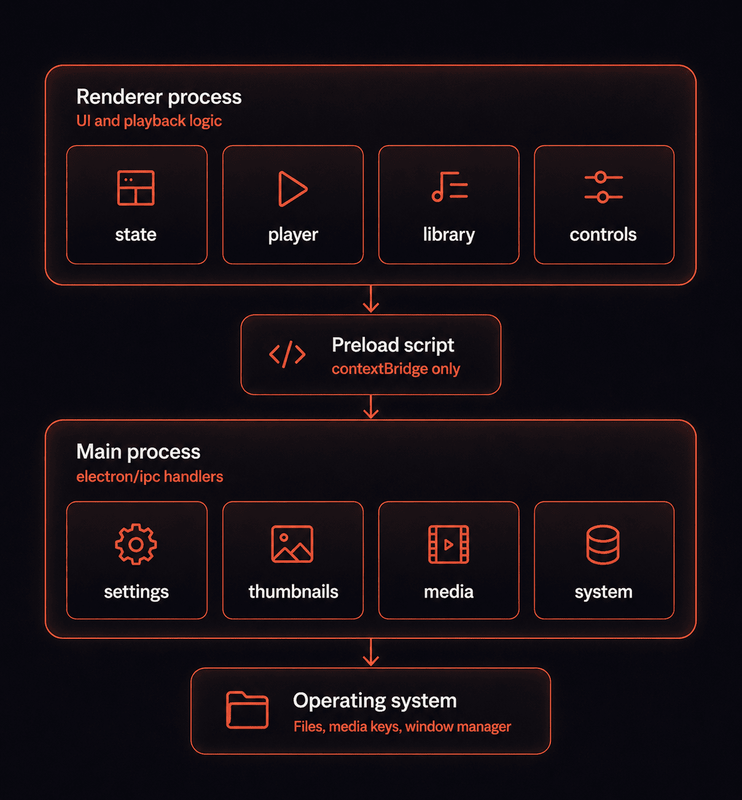
Renderer → Preload → Main Process → Operating System
Building the Player Experience
A core goal was making the player feel like a modern, polished piece of software, not a functional-but-generic media element wrapper. This meant building custom controls entirely from scratch: a scrub bar with a hidden-until-hover thumb, a collapsible volume slider, and on-screen toast-style indicators for volume, seek, and play/pause state that mirror the pattern used by YouTube and Spotify.
Key player capabilities include:
- Full transport controls, play/pause, next/previous, shuffle, three-mode repeat
- Fullscreen mode with auto-hiding controls and a fading title overlay
- Click-to-play/pause and double-click-to-fullscreen on the video surface itself
- Keyboard shortcuts for every common action, disabled while the search box is focused
- Native OS media key support via the Media Session API
.png)
Fullscreen playback, controls and title overlay fade out automatically after inactivity
Library, Metadata, and Thumbnails
Beyond playback, a large part of the project involved making the library itself feel
fast and complete. For audio files, embedded ID3/FLAC metadata, cover art, title, and
duration, is extracted in a single pass and cached, falling back to a cleaned filename
when a file isn't tagged. For video files, a thumbnail is generated by seeking a hidden
<video> element to a representative frame and drawing a cropped,
aspect-correct capture to canvas.
The library also supports drag-and-drop reordering, with the custom order persisted per folder to disk, so a manually arranged playlist survives a full app restart, not just the current session.
Challenges
A 12-second startup freeze
Opening large media libraries initially caused the interface to remain blocked while every thumbnail was generated before anything could be displayed. I redesigned the loading workflow so the library renders immediately with placeholder artwork while thumbnails are generated progressively in the background using controlled concurrency. The result was a much faster, more responsive startup experience even for larger libraries.
A genuine memory leak in thumbnail generation
During development I discovered a memory leak within the thumbnail generation workflow caused by the cleanup process repeatedly triggering itself. After identifying the root cause, I redesigned the cleanup logic to safely release resources only once, improving long-running stability and eliminating unnecessary background work.
Settings persistence across environments
The application's settings system initially relied on development-specific file locations, which caused issues in packaged builds. Migrating settings storage to Electron's standard application data directory made persistence reliable across Windows and Linux installations while improving portability.
Fullscreen that wasn't actually fullscreen
Creating a polished fullscreen experience required more than maximizing the video player. I redesigned the layout so playback controls behave as overlays instead of occupying permanent layout space, producing a cleaner, distraction-free viewing experience.
Key Features
- Recursive folder scanning for both audio and video in one unified library
- Embedded audio metadata extraction, cover art, title, duration
- Video thumbnail generation, throttled and cached to disk across restarts
- Drag-and-drop library reordering, persisted per folder
- Full transport controls with three-mode repeat and shuffle
- Fullscreen mode with auto-hiding controls and title overlay
- OS-level media key and lock-screen integration via Media Session
- Persistent app state, folder, track, volume, shuffle, repeat, window size and position
- Responsive portrait-mode layout for vertical monitors
- Packaged installers for Windows (NSIS + portable) and Linux (AppImage + deb)
Lessons Learned
Async bugs hide in loops, not in the async code itself
This project reinforced that application performance is often determined more by how work is scheduled than by the individual operations themselves. Designing asynchronous workflows around responsiveness can have a far greater impact than simply optimizing code.
Electron's multi-process boundary is a feature, not friction
Maintaining a clear separation between application layers made the project easier to extend as it grew. Defining clear boundaries between responsibilities reduced complexity, improved maintainability, and made future refactoring significantly easier.
Packaging reveals assumptions dev mode hides
Packaging the application revealed deployment issues that never appeared during development. It reinforced the importance of testing production builds early and often, rather than relying solely on the development environment.
Future Improvements
- Independent repeat-one and repeat-all modes, rather than a single shared cycling toggle.
- Playlist virtualization for very large libraries, so rendering scales independently of file count.
- A native player backend (e.g. mpv) as an option for lower memory usage during video playback, as an alternative to the built-in Chromium video pipeline.
- macOS packaging and a signed, notarized release, extending beyond Windows and Linux.
Results
Astral Echo is a fully packaged, cross-platform desktop application with installers for both Windows and Linux. Cold startup from launch to a usable window sits around 450ms in development, meaningfully faster than the 1–3 second range typical of production Electron apps, with library scanning and thumbnail generation running entirely in the background rather than blocking the UI.
Beyond the shipped feature set, the project became a genuine deep dive into Electron internals: IPC design, native OS integration through the Media Session API, safe settings persistence across platforms, and structuring a growing single-file renderer into maintainable modules before it became unmanageable.